Made for your
everyday kitchen
Good recipes.
Dinner sorted.
Keep the recipes you love. Plan what’s for dinner. Bring one grocery
list to the store.
Taters brings it all together, so your saved recipes become meals
you actually make.
Coming to Android · Currently in testing
✓
A little less “what’s for dinner?”A little more looking forward to it.
Your own recipesShared household plansGroceries from your menuEnglish · Español · Français
From “that looks good” to dinner
Save it. Plan it. Shop for it.
One simple routine, from finding a recipe to filling your basket.
01
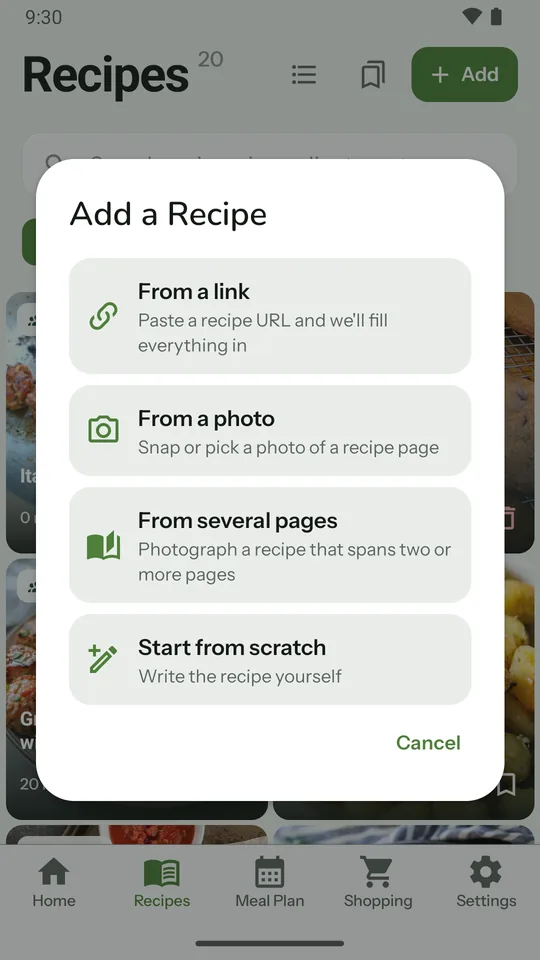
Give your recipes a home
Paste a recipe link, scan a photo, or write your own. Found one
while browsing? Tap Share and choose Taters. Review the
ingredients and steps, then pin favorites and organize
collections.
Links, cookbook pages, and handwritten favorites.
 02
02
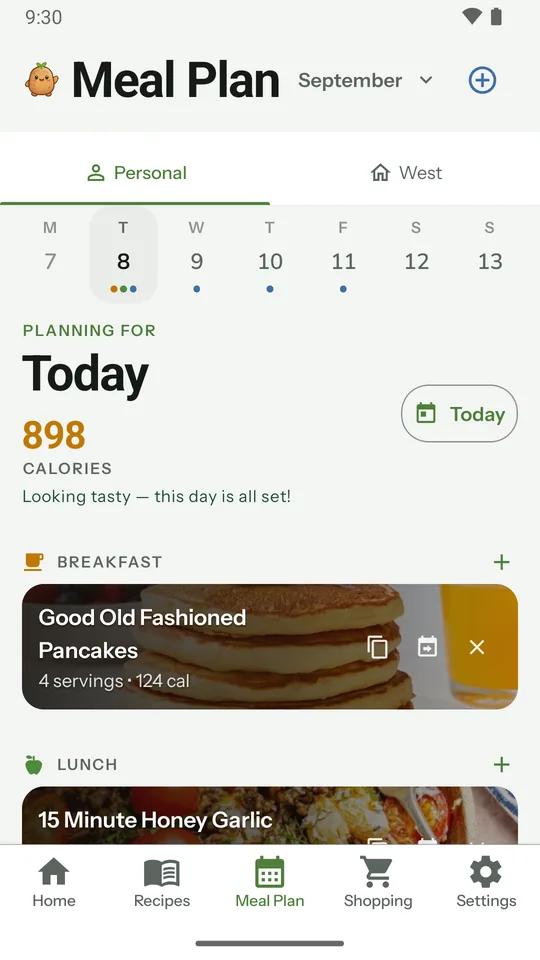
Make room for the good stuff
Add recipes to your meal plan, adjust servings to suit your
table, and copy a meal to another day for leftovers. See calories
for each day and a weekly nutrition summary.
Your recipes. Your week. Your way of eating.
 03
03
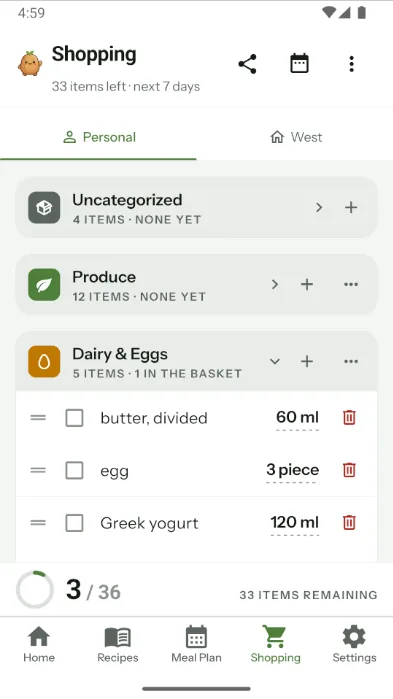
Take your plan to the store
Turn planned meals into a grocery list, sorted into store sections
like produce and dairy. Choose which days to shop for, add the
extras, and check items off as you go.
Fewer lists to juggle. More dinner sorted.
Better when you plan together
Same household.
Same dinner plan.
Share recipes, plan meals, and keep a household grocery list
together. Whoever’s cooking or shopping can see what’s on the
plan.
Household sharing comes with Taters Plus, for up to 6 people. Only
you need Plus. The people you invite join free.
A simpler weekly rhythm
- Find something you want to cook
- Decide together when to make it
- Bring the ingredients home
Less coordination.
More time around the table.
Made to be used, not just saved
A hand in the kitchen.
Cook at your own pace
Follow the steps in cook mode, which keeps your screen awake.
Check off ingredients and use timers to keep your place.
Make it fit your table
Adjust servings and switch between metric and imperial
measurements.
Keep it comfortable
Use your phone or tablet, where a week view shows your whole plan.
Choose light or dark mode, and cook in English, Spanish, or
French.
Start with your own recipe collection
Everyday basics. A little extra with Plus.
Taters
Your everyday recipe book
Free
- Up to 50 recipes
- Meal planning, nutrition overview, and grocery lists
- Collections, cook mode, timers, and serving adjustments
- 5 recipe imports to try within 7 days of your first
Taters Plus
More room. More together.
Everything in Free, plus
- Import 30 recipes a month from links and photos
- Unlimited recipes
-
Household sharing for up to 6 people. Members join free.
Prices and renewal terms are shown in the app before you
subscribe.
Up to 4 photos of one recipe count as a single import. An account is
required; importing and household sharing need an internet
connection.
A few things you might be wondering.
Can I add my own recipes?
Absolutely. Write a recipe yourself or use a recipe link or photo to
create an editable draft. You can review and change the ingredients,
instructions, and serving information before saving.
Will every link or photo work?
Results depend on the source and image quality. Some websites block
access, and some photos do not contain enough recipe detail. Always
review extracted ingredients, quantities, and steps. Recipes that
only appear in a video may not import.
How do recipe imports work?
Everyone can try 5 imports within 7 days of their first. After
that, importing from links and photos is part of Taters Plus, which
includes 30 a month. Up to 4 photos of one recipe count as a single
import. An import can use a credit even when the content cannot be
turned into a usable recipe; if our service fails, the credit is
refunded. Typing recipes yourself is always free.
Does everyone in my household need Plus?
No. Only the person who creates the household needs Taters Plus.
Up to 5 more people can join free and share the same recipes, meal
calendar, and grocery list.
Can I take my recipes with me?
You can export your library as JSON from account settings. You can
also delete your account in the app or request deletion through this
website. JSON export is not currently an in-app backup restoration
feature.
When can I try Taters?
Taters is currently in internal testing for Android. Email us below
to ask about early access. We’ll let you know whether a place is
available.

A good week starts with a little plan
Bring your favorite recipes.
We’ll bring the list.
Help shape Taters before launch. We’re looking for home cooks
who want to try it in their everyday kitchen.
Ask for early access ↗
Opens your email app · Android testing · Places subject to
availability